The Forge Roblox Script – The Forge [BETA]
The Forge has become a popular Roblox game in a very short time. In this, you mine ores, craft weapons, and fight enemies. You will get to have a lot of fun in the game, but the progress becomes a little slow. You have to collect materials in this, Apart from this, zombies also have to be defeated, and a lot of repeat tasks have to be completed. All of this takes a lot of time, especially when you want better gear or higher stats.
The Forge Script makes this whole grind much easier. Using this script, you can auto-mine ores in the game, auto-fight zombies, and even have your crafting become automatic. With this, you do not need to click again and again. The script works in the background, allowing you to level up quickly, earn more materials, and make gameplay much smoother. These scripts come with features like Auto Farm, Auto Mine, Kill Aura, Auto Zombies and Auto Forge.
Before sharing all the scripts, let me tell you that we only share scripts; we do not create them. Here you will see only tested and working The Forge scripts, which run easily on both PC and Mobile.
Apart from this, you do not know how to run the script safely, and to know the complete process of how to run the script using Roblox executors like Delta, KRNL, Arceus X, and Fluxus, read till the end of the post.
What Is Roblox The Forge
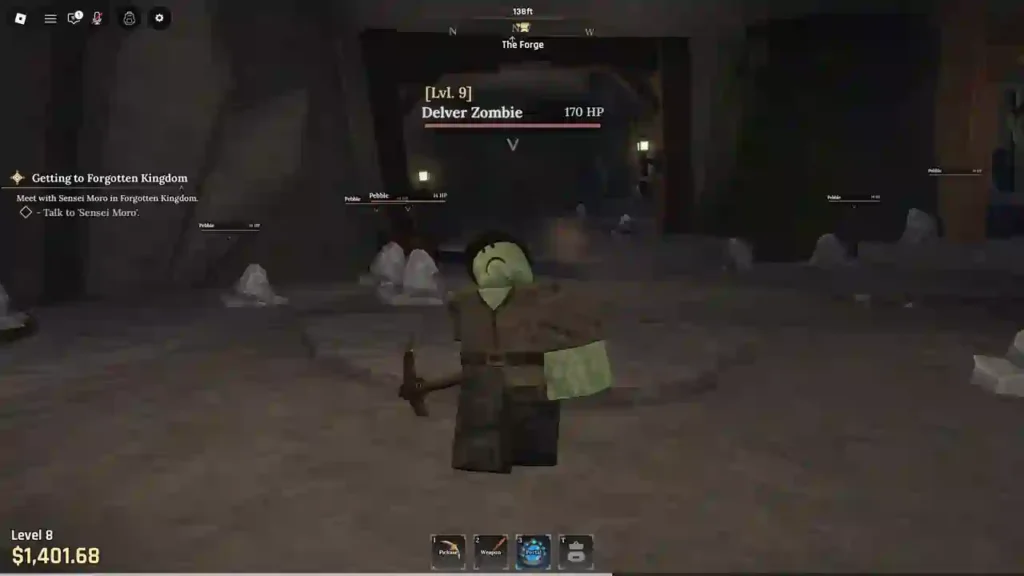
Roblox The Forge is a new RPG-simulator game that has been visited by 32.7M+ players so far.
The game’s main focus is on mining, forging, and fighting. You mine different ores, melt them to create weapons and armor of your choice, and then defeat enemies.
Each ore mix has its own design and unique stats. This allows you to create your own custom build.
In this game, you get to see 1,000+ forging variations. In this, you can craft swords, daggers, shields, and many more items. Apart from this, you can also collect Runes.
This makes the items much stronger. You can explore new islands in these. New content is also added in every update.
So let me tell you that The Forge is currently in the BETA stage. Developers keep fixing bugs. New features are also added. If you face any problem, you can tell us on the community server.
If you like mining, crafting, and combat games, The Forge is the perfect game for you. It seems simple, but the progression is deep and fun. That’s why players enjoy this game so much.
All Latest The Forge Scripts List (2025)
1. The Forge Script – Auto Forge + Ore Spawner + No Key
loadstring(game:HttpGet("https://lunor.dev/loader"))()2. The Forge Script – Chiyo Hub
loadstring(game:HttpGet("https://raw.githubusercontent.com/kaisenlmao/loader/refs/heads/main/chiyo.lua"))()3. HAZE HUB – AUTO FARM, AUTO FORGE, ORE, KILL AURA, ROLL, MINIGAME (NO KEY)
loadstring(game:HttpGet("https://haze.wtf/api/script"))()4. The Forge Script – Haze Hub
loadstring(game:HttpGet("https://haze.wtf/api/script"))()5. PEPEHOOK HUB – AUTO FARM, AUTO FORGE, ORE, KILL AURA, AUTO BUY, TP (NO KEY)
script_key="NO KEY REQUIRED CURRENTLY";
loadstring(game:HttpGet("https://raw.githubusercontent.com/GiftStein1/pepehook-loader/refs/heads/main/loader.lua"))()6. Zenith Hub – Instant Forge & Auto Mine
loadstring(game:HttpGet("https://zenithhub.cloud/panel/script"))()7. The Forge Script – NS Hub
loadstring(game:HttpGet("https://raw.githubusercontent.com/OhhMyGehlee/sh/refs/heads/main/a"))()8. The Forge Script – Airflow Hub
loadstring(game:HttpGet("https://airflowscript.com/loader"))()9. The Forge Script – Simca Hub
loadstring(game:HttpGet("https://raw.githubusercontent.com/notmydaisy/simca/main/games/the-forge"))()10. The Forge Script – Shaizy Hub
loadstring(game:HttpGet("https://api.luarmor.net/files/v3/loaders/d29f750a5d2c74070b792230ccde0f69.lua"))()11. The Forge Script – Solix Hub
loadstring(game:HttpGet("https://raw.githubusercontent.com/meobeo8/a/a/a"))()12. The Forge Script – ATG Hub
loadstring(game:HttpGet('https://raw.githubusercontent.com/ATGFAIL/ATGHub/main/The-Forge.lua'))()13. Vex Hub – AUTO FARM, ORE SKIPPER, ORE ESP, KILL AURA, AUTO FORGE (NO KEY)
loadstring(game:HttpGet("https://ry-zen.studio/raw/VexHub/Hub.lua?key=U2VjdXJlQXV0aEtleQ"))()14. Pollute Hub – AUTO FARM, ORE SKIPPER, ORE ESP, KILL AURA, AUTO FORGE
loadstring(game:HttpGet("https://pastefy.app/fASqIYxP/raw"))()15. Alchemy Hub – AUTO FARM, AUTO FORGE, DESYCN INVISIBLE (BEST)
loadstring(game:HttpGet("https://scripts.alchemyhub.xyz"))()16. Speed Hub – AUTO FARM, GODMODE, AUTO FORGE, ORE, KILL AURA, SELL (NO KEY)
loadstring(game:HttpGet("https://raw.githubusercontent.com/AhmadV99/Speed-Hub-X/main/Speed%20Hub%20X.lua", true))()17. NICS HUB – AUTO FARM, ORE SKIPPER, 100% MASTERWORK, AUTO FORGE, ESP
loadstring(game:HttpGet("https://api.junkie-development.de/api/v1/luascripts/public/4a149ec7015ec262afc48f0cb6e88f6fd242b9fcccc21c7747f6385888a9ebac/download"))()18. SPACE HUB – AUTO FARM, AUTO MINING, ATTACK NPC, TELEPORT, BUY
loadstring(game:HttpGet("https://raw.githubusercontent.com/Space-RB/Script/refs/heads/main/loader.lua"))()19. RIFT HUB – AUTO FARM, ORE SKIPPER, ORE ESP, AUTO FORGE, KILL AURA (NO KEY)
loadstring(game:HttpGet("https://rifton.top/loader.lua"))()20. Toasty Hub – AUTO FARM, ROLL RACE, USE POTION, AUTO FORGE, KILL AURA (NO KEY)
loadstring(game:HttpGet("https://raw.githubusercontent.com/nouralddin-abdullah/Airlines/refs/heads/main/Forge.lua"))()21. VXEZE HUB – AUTO FARM, AUTO MINING, AUTO SELL, ATTACK NPC (NO KEY)
loadstring(game:HttpGet("https://pandadevelopment.net/virtual/file/f3e2379f5d38627e"))()22. LUNOR HUB – AUTO FARM, AUTO FORGE, ORE, KILL AURA, SELL, AUTO BUY (BEST)
loadstring(game:HttpGet("https://lunor.dev/loader"))()23. AXIOM HUB – AUTO FARM, MINING ORE, AUTO ATTACK, KILL AURA (NO KEY)
loadstring(game:HttpGet("https://api.luarmor.net/files/v3/loaders/281e3549d77ad146fff9e409722b6140.lua"))()24. BONK HUB – AUTO FARM, MINING AREA, ORE, AUTO SELL, BUY, FORGE
loadstring(game:HttpGet("https://bonkhub.online/loader.lua",true))()25. UB HUB – AUTO FARM, AUTO MINING, AUTO FORGE, KILL AURA, SELL (NO KEY)
loadstring(game:HttpGet("https://raw.githubusercontent.com/TeamUBHub/UBLoader/refs/heads/main/index/Key.lua"))()26. BLACK HUB – AUTO FARM, GODMODE, AUTO FORGE, ORE, KILL AURA, SELL & MORE
loadstring(game:HttpGet("https://raw.githubusercontent.com/Skibidiking123/Fisch1/refs/heads/main/FischMain"))()27. LAZY HUB – AUTO FARM, INSTANT FORGE, ORE, KILL AURA, SELL, UNDETECTED (NO KEY)
getgenv().mobileMode = false
repeat wait() until game:IsLoaded()
loadstring(game:HttpGet("https://raw.githubusercontent.com/LioK251/RbScripts/refs/heads/main/lazyuhub_theforge.lua"))()28. XENITH HUB – AUTO FARM, AUTO FORGE, AUTO SELL, AUTO BUY & MORE
loadstring(game:HttpGet("https://api.luarmor.net/files/v4/loaders/d7be76c234d46ce6770101fded39760c.lua"))()29. NO1 HUB – AUTO FARM, AUTO FORGE, ORE, KILL AURA, SELL & MORE (NO KEY)
if not game:IsLoaded() then
    game.Loaded:Wait()
end
loadstring(game:HttpGet("https://raw.githubusercontent.com/SkibidiHub111/Forge/refs/heads/main/No1Dev"))()How to Run The Forge Script?
It is very simple to run The Forge script on your PC and mobile. You’ll first need a reliable Roblox executor, such as Delta, KRNL, Fluxus, Arceus X, or Synapse X. These are some of the most commonly used executors. These tools help a lot in injecting scripts into the Roblox game.
Step-by-step guide:
- First, you’ll need to install an executor. Delta and KRNL are best for beginners.
- Now launch Roblox and join The Forge game.
- Open Executor. Then press the “Inject” button. This connects the executor to the game.
- Copy the script you want to use and paste it into the Executor script box.
- Now press the “Execute” button. The script GUI will appear on the screen.
- Select Options in the GUI. Features like Auto Firm, Auto Mine, and Kill Aura will be enabled.
FAQs
What is The Forge Script?
It is a Roblox script. It helps you auto-mine, auto-fight, and auto-craft in the game.
Is The Forge Script safe to use?
Yes, if you use trusted executors like Delta or KRNL.
Can this cause a ban?
There is a small risk in every script. Use the features slowly and safely.
Why is the script not working?
Your executor may be old. Or the game received an update. Try again after updating.